The short version: a shopping list fails because it treats every item the same — and you don't. Some things you buy for one meal, some you always keep, some you grow. A flat list can't tell them apart, so you do the sorting yourself, in your head, in the aisle, every time. Give each ingredient one of those three roles, set once, and the list stops being something you write: the staples you keep top themselves up on a rhythm you choose, the meals you plan add only their main ingredients, and anything you grow is left off while it's in season. What's left is a list that's simply correct.
Everyone already has a system. It's a whiteboard, a running note on someone's phone, a half-remembered sense of what's in the cupboard, and a partner who texts are we out of tinned tomatoes? from the shops. It mostly works. The failures are small and constant — the third jar of cumin, the basil bought the week it was already thriving in the garden, the dinner planned around chicken you didn't have.
The reason it fails isn't laziness. It's that a shopping list treats every item the same, and you don't.
Why you keep buying a third jar of cumin
Some things you buy fresh for a meal: the fish for Thursday, the coriander for the curry. You want them once, for a reason, and then they're gone.
Some things you just keep: olive oil, salt, tinned tomatoes, the good mustard. You don't write them down because you plan to use them; you write them down because you've run low. They only enter your attention at the moment they're about to fail you.
And some things you grow: the basil, the silverbeet, the tomatoes in February. Whether you need to buy them this week is a question about the garden, not the pantry.
Three relationships, then: buy fresh, always have, we grow it. A flat list flattens all three into one column of text. It can't tell them apart, so you have to, every single time, standing in the aisle, deciding whether the tomatoes in front of you are the ones you keep a tin of, the ones ripening at home, or the ones you actually came for.
That sorting is the work. Not the writing of the list — the sorting you do to make the list mean anything. You are the machine doing it.
How do you organise a shopping list?
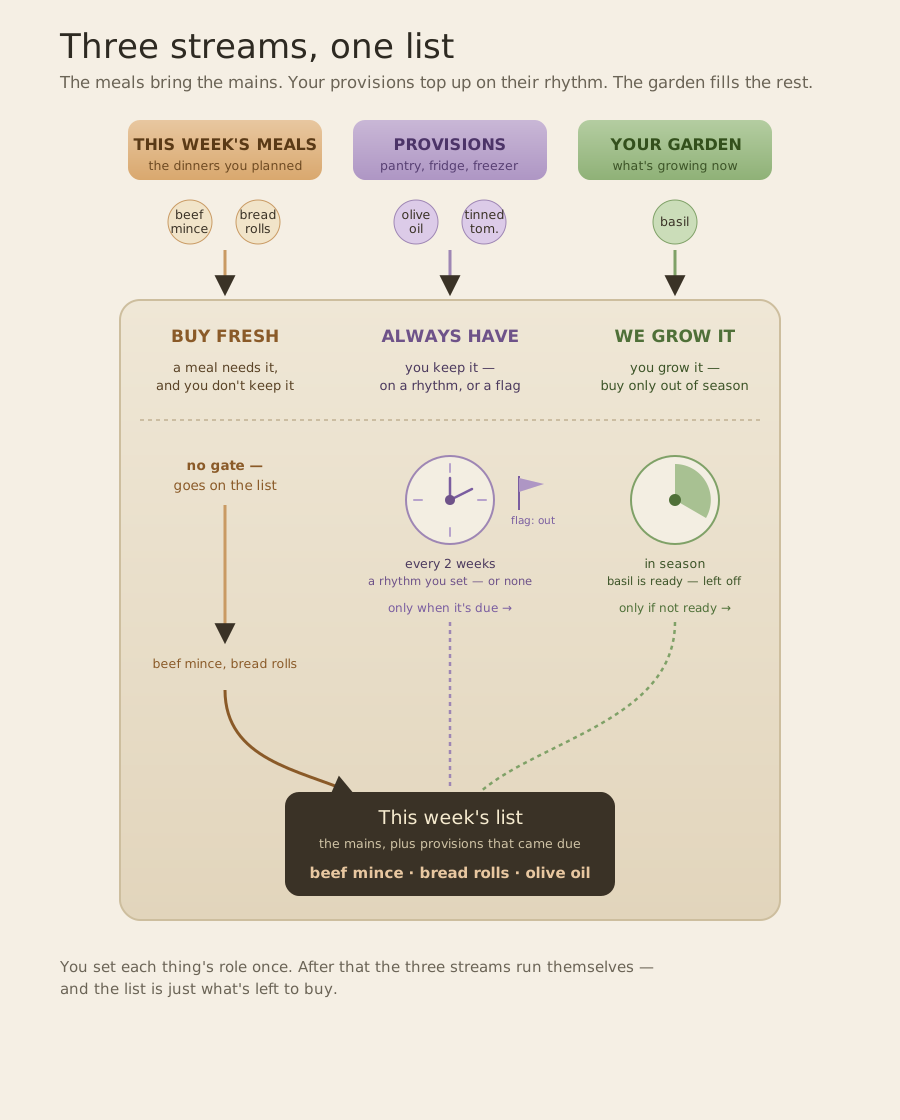
Stop flattening it. Decide, for each ingredient, which of the three it is: buy fresh, always have, or we grow it. You set it once and never again. After that the three kinds feed one list, and each kind looks after itself.
How do you keep track of pantry staples without counting them?
The things you always have — the olive oil, the butter, the tinned tomatoes, the bag of frozen peas — need no meal and no count. Give each one the rhythm you actually rebuy it at: every week, every couple of weeks, once a month, or no schedule at all. Set two weeks for the tomatoes and they appear on the list every two weeks on their own. No meal required, no number typed. Buying them resets the clock.
Noticed you're out early, because you made a big batch? Flag it, and it jumps onto the next list ahead of schedule. A rhythm for the ordinary weeks, a flag for the exceptions. Neither is a count — and that's deliberate. The moment an app tries to remember how many tins you have is the moment it starts being wrong. You already know it's three.
What should a planned meal add to the list?
Only the handful of things that make it that meal: the beef mince, the bread rolls, the fish for Thursday. The mains, the things you came to the shop for.
You don't list the olive oil or the tin of tomatoes against a meal. Those are staples, already handled by their own rhythm. So a planned meal only ever adds what you don't already keep or grow, and it never buys a fourth tin because a recipe happened to mention one.
The list is the three, added up and trimmed
What comes out isn't a list you wrote. It's this week's mains, plus the staples that came due, minus whatever the garden's already giving you: the difference between what the week needs and what you've already got covered. A list that's simply correct.
And it keeps itself honest. If an ingredient lands on the buy-fresh list every single week, it was probably an always-have all along.
How do you do this without an app?
On paper, and it takes one page.
Rule three columns. In the first, the things you always have — ten to fifteen, no more — and beside each one, how often you actually rebuy it: fortnightly, monthly, whenever. Not how many you own. In the second, the things you grow, and the months they look after themselves. In the third, the meals you actually cook, and beside each one the ingredients it needs that aren't already in the first column.
That third column is the part people get wrong on paper. Don't write down this week's meals. Write the repertoire: the twelve or fifteen things your household genuinely cooks, worked out once. Software can afford to re-derive a week from scratch every Sunday, because re-deriving costs it nothing. On paper the re-deriving is the entire labour, so you do it once and after that you only ever choose.
Then the week's shop is four lines of copying. Pick three or four meals off the third column and copy across what they need. Add anything in the first column that's come round on its rhythm, or that you noticed was low. Cross off whatever the garden is giving you. That's the list.
Nothing on the page changes week to week. It goes inside a cupboard door, and the only weekly work is choosing.
Take the paper version with you.
One A4 page: the things you always keep and how often, the things you grow, and the meals you actually cook with their ingredients already worked out. Fill it in once — after that the weekly work is choosing, not writing.
No newsletter, no drip — the page now, one email when it ships. Unsubscribe any time.
What we're building for this
This is exactly the job Hovenly Larder is built for — the free app for a household's meals and provisions. Provisions is our name for the always-haves, the things you keep whether they live in the pantry, the fridge or the freezer. You give each ingredient its role once, and Larder builds the week's shopping list from both sides: the mains your planned meals need, and the provisions that have come due on their rhythm. Just the gaps, grouped the way you walk the aisles, with a tap on each that tells you why it's there. The provisions look after themselves; nobody keeps the list in their head. And the meals are optional, because the provisions spine works on its own from day one.
Larder is free and available now — see how it works, or start today. It's early and we're still shaping it, so what you notice becomes what gets built next; getting in now is how you help decide that.
The difference between this and a whiteboard is the difference between writing down what you think you need and being handed what you actually do. Set the roles once, plan the meals, get the list.